
A major transformation took place when computing power moved from the PC/phone to the Internet.
The PC used to be the device that did the work and used the Net to deliver it. Now, the PC, iPod, cellphone are merely connection devices and the Net does the "work".
An example. Your home phone probably has a built in answering machine which jacked up the price for your phone. When the power goes out, so does the time and your recorded message. Your local phone company offers voicemail as a service option. For x amount a month they record and store your messages. Your phone no longer does the "work", your local phone company's server does.
This transformation is called "cloud computing" and it has disrupted the personal computing industry.
Consumers are maxing out their iPods and other digital devices. The next place to store their stuff is in the cloud.
I said a while back that Apple is sitting on a goldmine with iTunes.
iTunes could be a mobile commerce platform
Apple could introduce and iTunes browser.
iTunes represents a killer platform, it's only fitting that they lead the way to consumer cloud computing.
From C/Net Apple to store video in the cloud
By cramming digital songs, videos, and all manner of software applications on computers and handheld devices, there's some indication thatconsumers are maxing out hard drives, particularly on smaller mobile devices. That has led to speculation among Apple watchers that some consumers might slow their purchasing of new content, if they have nowhere to easily put it.
Now imagine being able to access ALL of your digital content from ANY device, regardless of your location? That is what Apple wants to do. Think of one password protected site that allows you to retrieve and play ANY of your digital content on ANY device....that is iTunes cloud computing.
Could Apple Trigger The Cloud Computing Boom?
Could Apple Trigger The Cloud Computing Boom?
A major transformation took place when computing power moved from the PC/phone to the Internet.
The PC used to be the device that did the work and used the Net to deliver it. Now, the PC, iPod, cellphone are merely connection devices and the Net does the "work".
An example. Your home phone probably has a built in answering machine which jacked up the price for your phone. When the power goes out, so does the time and your recorded message. Your local phone company offers voicemail as a service option. For x amount a month they record and store your messages. Your phone no longer does the "work", your local phone company's server does.
This transformation is called "cloud computing" and it has disrupted the personal computing industry.
Consumers are maxing out their iPods and other digital devices. The next place to store their stuff is in the cloud.
I said a while back that Apple is sitting on a goldmine with iTunes.
iTunes could be a mobile commerce platform
Apple could introduce and iTunes browser.
iTunes represents a killer platform, it's only fitting that they lead the way to consumer cloud computing.
From C/Net Apple to store video in the cloud
By cramming digital songs, videos, and all manner of software applications on computers and handheld devices, there's some indication thatconsumers are maxing out hard drives, particularly on smaller mobile devices. That has led to speculation among Apple watchers that some consumers might slow their purchasing of new content, if they have nowhere to easily put it.
Now imagine being able to access ALL of your digital content from ANY device, regardless of your location? That is what Apple wants to do. Think of one password protected site that allows you to retrieve and play ANY of your digital content on ANY device....that is iTunes cloud computing.
Google And National Security Alliance (NSA) To Monitor Internet
Too much "Big Brother", or a great idea?
Will Microsoft's search engine, Bing see a surge in use because of this?
Will IPv6 help?
From Washington PostGoogle to enlist NSA to help ward off cyberattacks.
The world's largest Internet search company and the world's most powerful electronic surveillance organization are teaming up in the name of cybersecurity.
The sources said the deal does not mean the NSA will be viewing users' searches or e-mail accounts or that Google will be sharing proprietary data.
Over the past decade, other Silicon Valley companies have quietly turned to the NSA for guidance in protecting their networks.

Google And National Security Alliance (NSA) To Monitor Internet
Too much "Big Brother", or a great idea?
Will Microsoft's search engine, Bing see a surge in use because of this?
Will IPv6 help?
From Washington PostGoogle to enlist NSA to help ward off cyberattacks.
The world's largest Internet search company and the world's most powerful electronic surveillance organization are teaming up in the name of cybersecurity.
The sources said the deal does not mean the NSA will be viewing users' searches or e-mail accounts or that Google will be sharing proprietary data.
Over the past decade, other Silicon Valley companies have quietly turned to the NSA for guidance in protecting their networks.
Enable the (Hidden) Administrator Account on Windows 7 or Vista
Many people familiar with prior versions of Windows are curious what happened to the built-in Administrator account that was always created by default. Does this account still exist, and how can you access it?
The account is created in Windows 7 or Vista, but since it’s not enabled you can’t use it. If you are troubleshooting something that needs to run as administrator, you can enable it with a simple command.
Note: You really shouldn’t use this account for anything other than troubleshooting. In fact, you probably shouldn’t use it at all.
Enable Built-in Administrator Account
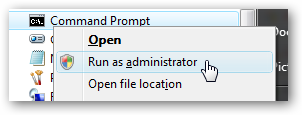
First you’ll need to open a command prompt in administrator mode by right-clicking and choosing “Run as administrator” (or use the Ctrl+Shift+Enter shortcut from the search box)
You should see a message that the command completed successfully. Log out, and you’ll now see the Administrator account as a choice. (Note that the screenshots are from Vista, but this works on Windows 7)
Now type the following command:
net user administrator /active:yes

Enable the (Hidden) Administrator Account on Windows 7 or Vista
Many people familiar with prior versions of Windows are curious what happened to the built-in Administrator account that was always created by default. Does this account still exist, and how can you access it?
The account is created in Windows 7 or Vista, but since it’s not enabled you can’t use it. If you are troubleshooting something that needs to run as administrator, you can enable it with a simple command.
Note: You really shouldn’t use this account for anything other than troubleshooting. In fact, you probably shouldn’t use it at all.
Enable Built-in Administrator Account
First you’ll need to open a command prompt in administrator mode by right-clicking and choosing “Run as administrator” (or use the Ctrl+Shift+Enter shortcut from the search box)
You should see a message that the command completed successfully. Log out, and you’ll now see the Administrator account as a choice. (Note that the screenshots are from Vista, but this works on Windows 7)
Now type the following command:
net user administrator /active:yes
How Parents Can Block Certain Websites from Children at Home
[For non-techie parents who have a computer at home and are worried about their kids safety online.]
block websites at homeA mother recently wrote saying she is very concerned that her young children are spending too much time on websites like Orkut, MySpace and Facebook.
Her worries are not just about children wasting time on the Internet – it’s more about the activities that children are doing on these sites. She is concerned that children could be interacting with complete strangers (or online predators) and even sharing personal information.
And with some news reports saying that criminal activities could have been planned on Orkut, the mother has finally made up her mind to restrict access to Orkut and some other websites on the home computer.
The only problem is that she has absolutely no clue about how to block websites – parental control software like Net Nanny or Norton Internet Security are pretty good but they cost money.
Now before you take this extreme step of blocking website (that is very likely to be opposed by children), try a few things:
1. Educate your children about the dangers of sharing information online with strangers. Family members should talk in detail about privacy and the web.
2. Place the computer in the living area of your home from where you can easily see the screen so you’ll have some idea about activities that children are doing on the computer including the websites they are visiting frequently.
3. Orkut is an open social network – that means you can easily see who’s in the friends’ list of your children and what kind of text notes (or scraps) are they exchanging with each.
Finally, to block websites on your home computer without investing in expensive software, here’s the trick (for Windows PCs):
Step 1: Click the Start button and select Run. Now type the following text in that Run box:
notepad c:\WINDOWS\system32\drivers\etc\hosts
Step 2: You will see a new notepad window on your screen containing some cryptic information. Don’t panic. Just goto the last line of the file, hit the enter key and type the following:
127.0.0.1 orkut.com
127.0.0.1 facebook.com
127.0.0.1 myspace.com
or
209.85.171.100 facebook.com
209.85.171.100 www.facebook.com
Save the file and exit. That’s it. None of the above sites will now open on your computer.
You can block as many websites as you like with the above technique. If you want to remove the ban later, open the same file as mentioned in Step 1 and delete the above lines.
download net nanny free
Pretty simple but remember, our children are also very smart

Subscribe To


 Posts
All Comments
Posts
All Comments
Popular Posts
-
American rockers JOURNEY debuted five news songs from their forthcoming album, "Eclipse" , on February 23, 2011 at the Planet Ho...
-
The results are improved cement quality and increased mill throughput. The software Sicement IT MCO has been installed for its first opera...
-
(AGI) Catania - The Postal & Communications Police Department of Catania, coordinated by the city's DA office, has a suspect. The ...
-
A few days ago, the internet freaked out over a viral video of a guy who hacked Times Square video screens with a live feed from an iPhone....
-
As we patiently wait for Dark Souls to arrive in North America, Namco Bandai and From Softwa...
-
In conjunction with its launch of the next generation of analytics , SAP AG (NYSE: SAP) today introduced six new SAP® BusinessObjects™ a...
-
Spectral Souls Android Game Software development kits--or SDKs, as they are more commonly known--are extremely important to developers. Th...
-
ince it emerged in the 1990s, digital music has been hugely popular with fans, but for online music companies and their investors it has a...
-
04.03.2011 21:05:42 ezPaycheck, small business payroll software, is affordable but fully functional software designed for the small busines...
-
LUDHIANA: Authorities of the city's Municipal Corporation are all set to upload the records of its more-than-6,000 employees on an int...


OUR WORLD

Popular Posts
-
American rockers JOURNEY debuted five news songs from their forthcoming album, "Eclipse" , on February 23, 2011 at the Planet Ho...
-
The results are improved cement quality and increased mill throughput. The software Sicement IT MCO has been installed for its first opera...
-
(AGI) Catania - The Postal & Communications Police Department of Catania, coordinated by the city's DA office, has a suspect. The ...
-
A few days ago, the internet freaked out over a viral video of a guy who hacked Times Square video screens with a live feed from an iPhone....
-
As we patiently wait for Dark Souls to arrive in North America, Namco Bandai and From Softwa...
-
In conjunction with its launch of the next generation of analytics , SAP AG (NYSE: SAP) today introduced six new SAP® BusinessObjects™ a...
-
Spectral Souls Android Game Software development kits--or SDKs, as they are more commonly known--are extremely important to developers. Th...
-
ince it emerged in the 1990s, digital music has been hugely popular with fans, but for online music companies and their investors it has a...
-
04.03.2011 21:05:42 ezPaycheck, small business payroll software, is affordable but fully functional software designed for the small busines...
-
LUDHIANA: Authorities of the city's Municipal Corporation are all set to upload the records of its more-than-6,000 employees on an int...